Music Sense — User Guide
Create quality DJ sets in minutes
This guide explains what Music Sense Software is, covers its main features, shows practical setup recipes for common gigs, and gives tips to get reliable and professional results quickly. This will help you sound better behind the decks without effort.
✨ Key Features
- Analyze the key, tempo and energy level of your tracks, allowing the Music Sense algorithm to assist you in creating DJ sets.
- Build a DJ set automatically (fast batch generation) or design it manually (guided, step-by-step transitions), following your set pattern (set to complete) and several preferences you may have (Harmonic Mixing, tune preferences, rating, energy modes...) in order to create the perfect set in no time.
- Export your DJ set to your favorite DJ software and export automatic playlists for live DJing.
🔧 Initial setup
- Download and run the correct software installer depending on your operating system (from your user account or the email you've received after purchase):
 Windows: MSI installer
 macOS: PKG installer (select the correct version depending on your CPU architecture, either the newest Apple Silicon or older Intel)
 - After installation, run the software, then copy and paste the activation code you’ve received by email or from your user account. This will unlock the software.
- After successful activation, click on the Add new tracks button on the left panel of the My Library page to add your tracks. You can select one or multiple folders. Music Sense will add them to the database and analyze them (including all subfolders).
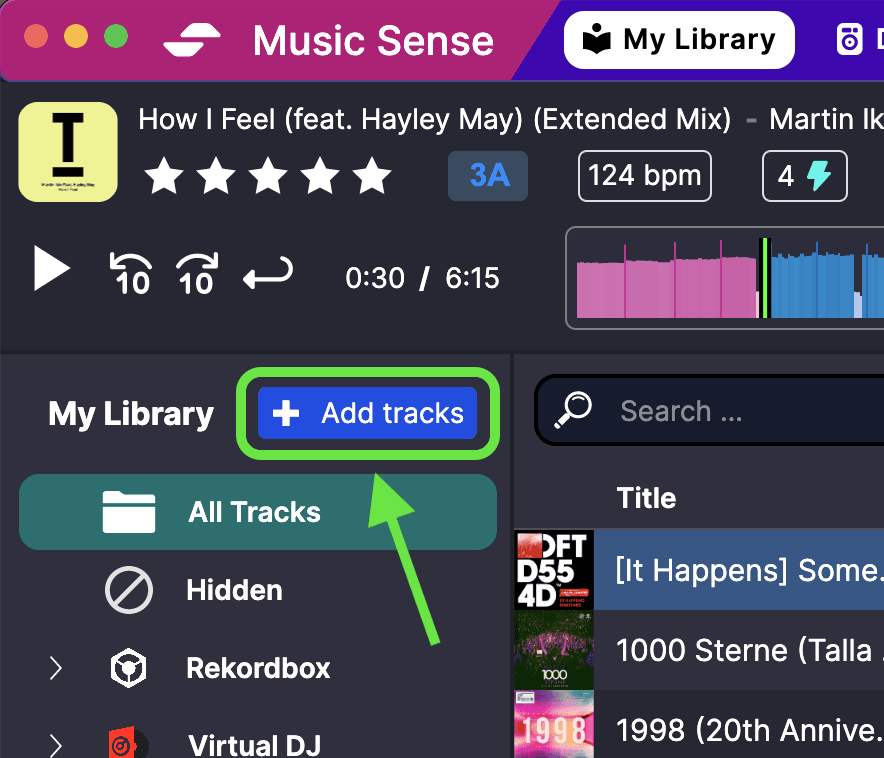
Analysis can take 30 seconds up to 5 minutes per 100 tracks, depending on your computer’s performance. For faster analysis, please close any other software running in the background and only add the folders containing the tracks you really need.
🧹 Clean your library
A clean, well-organized music library is crucial for generating high-quality DJ sets.
Hide duplicates
Duplicated tracks may confuse listeners. Open the built-in Duplicates folder, then right-click and select "Hide from library".
💡 Don't delete them, they may be re-added when importing new tracks.
Fix missing tracks (Not Found)
Tracks that have been moved or deleted appear in the Not Found folder. Either delete them by right-clicking or re-analyze if you've moved them back.
🔨 How to build a DJ set
- Prepare your input lists
- Create an Auto list for a specific collection of tracks using custom filters (tempo, rating, tags, energy). You can create genre-specific tracklists like House, Techno, or mood-based lists like Chill, Peak-time, Warm-up, etc. For example, if you need to create a Progressive House DJ set, select "Progressive House" (that appears only if at least one track has been tagged with this genre) and deselect "Without any genre" and "If not specified". You can make it additive (include the tracks) or subtractive (exclude them). Be creative!
- Fill a Manual list if you need full control over the included tracks. Drag and drop tracks from the library to add them.
- Put tracks you don’t want into a Disabled list (poor quality, duplicates, or license-restricted tracks). Drag and drop tracks from the library to add them.
- You can disable any tracklist you don’t want to use for the current set generation. It will appear greyed out.
- Design the set pattern
- Add Multiple tracks by clicking on the button. That number of tracks will be filled by the set generator.
- Drag and drop specific tracks with your mouse or trackpad to add a Locked track that will appear no matter what (example: intro track, wedding-specific track, guest appearance, etc.).
- Add a Pause by clicking the button if you're planning to pause at a specific time for any reason (mic announcement, live instrument...).
- Move any element by dragging and dropping it to the desired position.
- Set preferences
- Max BPM transition: Choose the maximum tempo change you're comfortable with. 6 BPM may be a good starting point for smooth mixes; increase if you want more variety or want to allow more transitions, or decrease for tighter mixes.
- Harmonic mixing (from 1 to 4):
- 1 : safe neighbor keys, 1 semitone change ( Simplest )
- 4 : allows more complex transitions like Energy Boost, Pay-Attention Mix, Jaws Mix, etc. ( Most creative )
- Rating mode:
- Best to maximize overall set quality.
- Probability to favor higher-rated tracks but keep variety.
- Disabled to ignore ratings. Select this if you don't rate your tracks.
- Energy mode:
- Guided for long-term energy curve (builds and drops across the set).
- Smooth for smooth per-transition energy evolution.
- Disabled to ignore energy levels.
- Generate & refine
- Click on "Generate a set":
- Automatic: creates many full sets in an instant. You can compare the generated DJ sets, generate a new one and replace any individual tracks by selecting it.
- Set Builder: assists you in creating the set manually using a transition graph where you confirm each step while listening to the individual transitions.
- When you're done, export your set to your favorite DJ software!
- Click on "Generate a set":
💾 Export your set
Once you've created your perfect DJ set, you can export it to your favorite DJ software. Music Sense supports the following platforms:

Rekordbox
Available - Requires XML file configuration

Virtual DJ
Fully integrated

Serato
Coming soon in a future update

Traktor Pro
Coming soon in a future update
M3U playlist (Universal)
Always available - Compatible with all DJ software
Export your set as an M3U file and import it into any DJ software. Please refer to your software's documentation for the exact import steps, but it usually involves importing the M3U file as a playlist. Here are some examples:
- • Rekordbox: File > Import > Import playlist
- • Virtual DJ: Drag & drop into a playlist
- • Serato: File > Import > Import crates
- • Traktor Pro: File > Import > Import playlist
Rekordbox Setup
If you don't have a rekordbox.xml file yet, here's how to prepare it:
- Open Rekordbox
- Go to File > Export Collection in xml format
- Name the file
rekordbox.xmland save it somewhere you can find it again (e.g.,Music/rekordbox/rekordbox.xml) - Go to Preferences > Advanced > Database and under "Imported Library" make sure the path to your
rekordbox.xmlfile is set to the same location - Finally, go to Preferences > View > Layout and make sure "rekordbox xml" is selected so that you can access its content under its own section
Virtual DJ Setup
Virtual DJ exportation is fully integrated. To enable it:
- Go to Settings > Software link > Virtual DJ
- Specify the path to your VirtualDJ Program files folder containing the
database.xmlfile - Once configured, you can export your sets directly to Virtual DJ where new playlists will appear
🔥 Troubleshooting
Common causes & fixes:
⚠️ Conflicting locks / constraints
Two locked tracks require incompatible tempos or keys, remove or relocate them.
📊 Not enough input tracks
Some tracklists may be disabled or have overly strict filters. Try adding more tracks or new tracklists. This can also slow down the generation process.
🎵 Harmonic mixing too strict
Lower the harmonic strictness and allow more creative mixes.
⚡ Energy mode too strict
Try Smooth mode if you were using Guided or try disabling it completely.
🎶 Max BPM transition too low
Increase it by a few BPM to allow more transitions.
⭐ Rating mode too strict
If you have too many not-rated tracks displayed as "_", try disabling the rating mode.
🚫 Disabled list contains needed songs
Check if some Disabled lists contain needed songs. Try disabling them temporarily for testing.
📧 If you think there is a bug with the set generation, please contact the support at music.sense.app@gmail.com.
📄 Practical scenarios examples
Below are ready-to-apply templates. You may use them as starting points and tweak to taste.
☕️ Chill / Lounge / Café
Pattern: 20-40 tracks per hour (locked tracks optional)
Tempo: < 125 BPM, Energy < 5
Preferences: Harmonic Simple, Energy Smooth (±2), Rating Disabled
Select chill genres like Classic House
🪩 Club / Private party
Pattern: 20-40 tracks per hour, progressive energy from 2 to 8
Preferences: Max BPM 3–6, Harmonic Creative (3-4), Energy Guided
Rating: Probability or Disabled
Use Manual generation if you need better control over each transition
🎉 Festival / Concert
Pattern: Complex structure with locked tracks (intro, special moments, outro)
Tempo: Depends on your mood & vibe
Preferences: Max BPM 5, Harmonic Creative, Energy Guided or Smooth
Rating: Best for key sets, Probability for variety
Use Manual generation to ensure best quality
🤵♀️ Wedding / Corporate
Pattern: 20-40 tracks per hour with locked tracks for key moments
Input: Manual list for must-plays + Auto lists (90–130 BPM)
Preferences: Max BPM 5, Harmonic 2-3, Energy Smooth (±2)
Rating: Best or Disabled
Use Manual generation for first dance & speeches
🎙️ Radio show / Podcast
Pattern: Small groups separated by Pauses for ads or talk
Input: Theme-tailored tracklists matching show vibe
Preferences: Max BPM 6, Harmonic 2, Energy Smooth (±2) or Disabled
Rating: Probability or Disabled
Use Manual generation to confirm transitions
❔ FAQ
- Why are some tracks not appearing in the generated set?
- They may be in a Disabled list, not included in any tracklist, excluded by filters (tempo/genre/energy), or conflicting with locked-track constraints.
- How do I get more creative mixes safely?
- Slide Harmonic mixing toward Creative, but make sure you have either a lot of tracks or even better hand-selected themed tracklists (using tags) to ensure best results.
- I can't find a specific feature I need. What do I do?
- Please contact the support at music.sense.app@gmail.com explaining what you need. We need your feedback to improve Music Sense!